Choose a figure
Start with a fitted result from the quick start. plot(result)
selects an indirect-effect display automatically;
plot(summary(result)) displays all selected core effects.
Both inherit the saved standardization setting and return editable
ggplots.
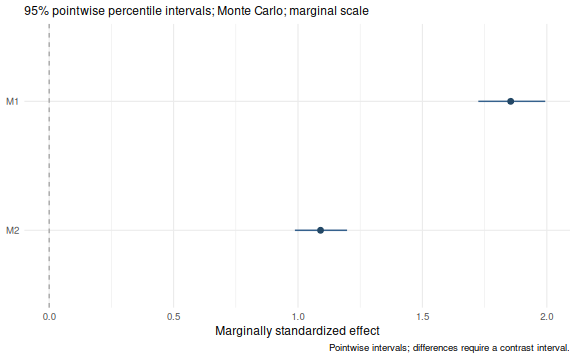
Forest: compare effects and intervals
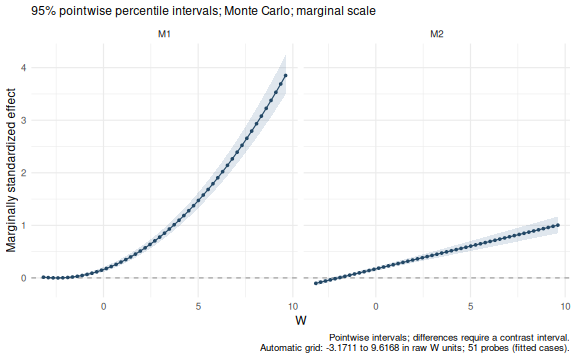
Curve: use a continuous moderator
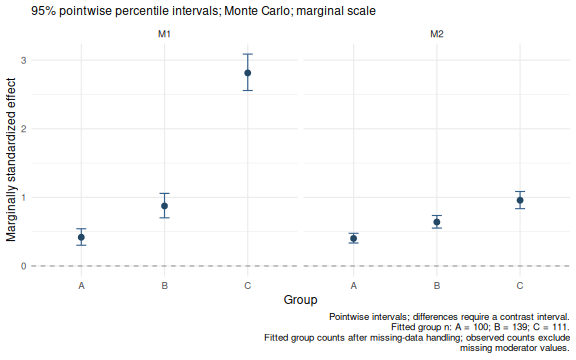
Category points: compare groups
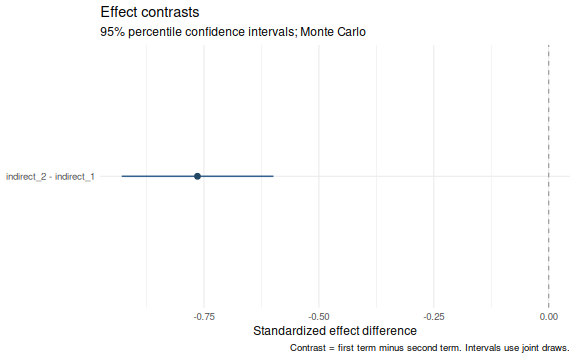
Difference: show a contrast and its interval
Recommended route: create the example fits,
then use the shared plot method.
For a custom contrast, extract it with wsmed_contrasts()
and call plot(); the results guide supplies
a short example.
The named plotting helpers later on this page remain available for stored-table compatibility. They can use different bootstrap interval conventions; review interval conventions before comparing figures.
Reproducible two-condition data
Run once: create the three example fits
set.seed(918)
n <- 350
w <- rnorm(n, 3, 2)
avg1 <- rnorm(n); avg2 <- rnorm(n)
dm1 <- 2 + .8*w + rnorm(n)
dm2 <- 1 + .4*w + .3*dm1 + rnorm(n)
dy <- .5 + .6*w + .5*dm1 + .7*dm2 + .2*dm1*w + .3*avg1 + rnorm(n)
y1 <- rnorm(n)
dat <- data.frame(
  M11=avg1-dm1/2,
  M12=avg1+dm1/2,
  M21=avg2-dm2/2,
  M22=avg2+dm2/2,
  Y1=y1,
  Y2=y1+dy,
  W=w
)
dat$Group <- cut(w, c(-Inf,2,4,Inf), labels=c("A","B","C"))
plain <- wsMed(
  data = dat,
  M_C1 = c("M11", "M21"),
  M_C2 = c("M12", "M22"),
  Y_C1 = "Y1",
  Y_C2 = "Y2",
  standardized = TRUE
)
continuous <- wsMed(
  data = dat,
  M_C1 = c("M11", "M21"),
  M_C2 = c("M12", "M22"),
  Y_C1 = "Y1",
  Y_C2 = "Y2",
  W = "W",
  MP = c("b1", "d1"),
  standardized = TRUE
)
categorical <- wsMed(
  data = dat,
  M_C1 = c("M11", "M21"),
  M_C2 = c("M12", "M22"),
  Y_C1 = "Y1",
  Y_C2 = "Y2",
  W = "Group",
  MP = c("b1", "d1"),
  standardized = TRUE
)
These fits request standardized output; the default
plot() inherits that choice. They otherwise use the default
20,000 Monte Carlo draws. The three fits illustrate the available
displays. Grouping a continuous moderator changes the fitted model, so
the category plot represents a separate analysis of these simulated
data.
A consistent plot method
plot() uses a forest plot for ordinary effects, a
continuous curve for a continuous moderator, and category points for a
categorical moderator. Specify view to choose another
supported display. terms selects effects and their order;
labels changes displayed names.
plot(plain)
plot(continuous)
plot(categorical)These calls use the default effect selection and plot layout. To select or relabel effects, change the probe grid, or reorder categories, specify the corresponding arguments explicitly:
plot(
  plain,
  terms = c("indirect_2", "indirect_1"),
  labels = c(indirect_1 = "Via M1", indirect_2 = "Via M2"),
  title = "Indirect effects"
)
plot(
  continuous,
  n = 41,
  scale = "marginal",
  terms = "indirect_1",
  title = "Conditional indirect effect",
  x_label = "W (raw units)",
  rug = TRUE
)
plot(
  categorical,
  at = list(Group = c("C", "A", "B")),
  ncol = 2,
  title = "Effects in the selected category order"
)
An automatic curve uses 51 equally spaced probes by default, from the
smallest to the largest finite raw moderator value among fitted cases.
For MI, the first completed dataset defines this range. The caption
reports the range and number of probes. Curves join those probes; their
bands are pointwise intervals, not simultaneous bands or exact
Johnson–Neyman regions. A forest plot of a continuous-moderator model
uses the reference value unless at is supplied.
rug = TRUE marks observed raw moderator values along a
curve’s horizontal axis. It uses fitted cases and excludes missing or
imputed moderator values, including in MI. It is available when plotting
a fitted/inference/one-call object, which retains the original data;
extracted effects alone do not contain the observations. Rug marks
describe where data occur, without changing estimates or interval
widths.
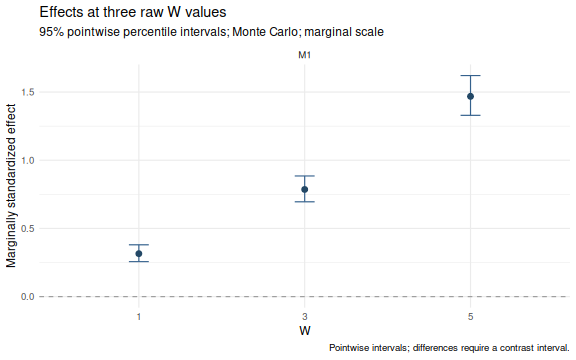
plot(
  continuous,
  view = "conditional",
  at = list(W = c(1, 3, 5)),
  terms = "indirect_1",
  title = "Effects at three raw W values"
)
The same methods work after a staged analysis. A fit without inference shows point estimates only. Extracting results first is useful for checking exactly which estimates and intervals a plot displays:
effects <- wsmed_effects(
  continuous,
  at = list(W = c(1, 3, 5)),
  terms = "indirect_1",
  scale = "marginal"
)
summary(effects)
#> wsMed indirect | marginal scale | mc
#> 95% percentile intervals; 20000 joint draws; SE from effect draws
#> Condition contrast: C2 - C1
#> Moderator: W in raw units; centering reference = 3.23288
#> Standardization: effect / marginal model-implied SD(Y2 - Y1); condition contrast is unscaled.
#> Plug-in marginal outcome-difference SD: 6.28886
#> The denominator is not a moderator-specific conditional SD.
#>                          Estimate Std. Error CI lower CI upper
#> indirect_1@1: M1 [W = 1]   0.3150     0.0314   0.2565   0.3799
#> indirect_1@2: M1 [W = 3]   0.7859     0.0485   0.6953   0.8847
#> indirect_1@3: M1 [W = 5]   1.4683     0.0748   1.3294   1.6210
#> Inference draws: 20000 retained of 20000 ; 0 excluded before effect extraction.
#> Use as.data.frame() for the full-precision table and metadata.
p <- plot(effects)
p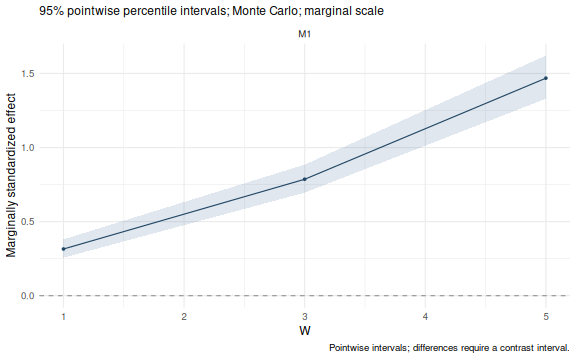
stopifnot(identical(p$data$estimate, as.data.frame(effects)$estimate),
          identical(p$data$conf.low, as.data.frame(effects)$conf.low))
Extracted results retain only the probes they contain;
plot(effects) does not add a grid. Use
wsmed_effects() to choose different probes or a different
scale. plot(effects, level = .90) recalculates percentile
limits from its stored draws. p$data retains unrounded
values; estimate, conf.low, and
conf.high are also available in plots produced by the named
helpers. Unknown arguments are rejected by the plot methods, so a
misspelled title is not silently ignored.
The summary uses a coefficient-style numeric table without adding
p-values. It identifies whether standard errors come from effect draws;
summaries of fits instead identify the fitted or Rubin-pooled parameter
covariance. as.data.frame(effects) retains the complete
table and metadata.
Interval conventions
plot() uses the percentile intervals returned by
wsmed_effects(), including when bootstrap parameter tables
were requested with another interval type. For a one-call object holding
two inference methods, specify plot(result, method = "mc")
or plot(result, method = "bootstrap").
The named helpers preserve legacy behavior:
plot_effects() uses the stored parameter-table limits,
including bias-corrected bootstrap limits if requested. Conditional and
contrast helpers use their stored percentile intervals. The subtitle
identifies the convention. A difference between a percentile interval
and a bias-corrected interval is therefore expected; it does not
indicate that plotting reran the analysis. The helpers continue to
accept engine = "boot", while the plot methods use
method = "bootstrap".
Optional named plotting helpers
The following sections show more explicit display settings. The
generic plot() calls above are sufficient for a default
figure.
Forest plots
plot_effects() displays complete indirect effects, their
total, the direct effect (cp) and the total effect. Choose
rows and their display order with paths; use a named
labels vector for readable descriptions.
forest <- plot_effects(
  plain,
  standardized=TRUE,
  paths=c("indirect_1", "indirect_2", "total_indirect", "cp", "total_effect"),
  labels=c(indirect_1="Via M1", indirect_2="Via M2",
           total_indirect="Total indirect", cp="Direct", total_effect="Total")
)
forest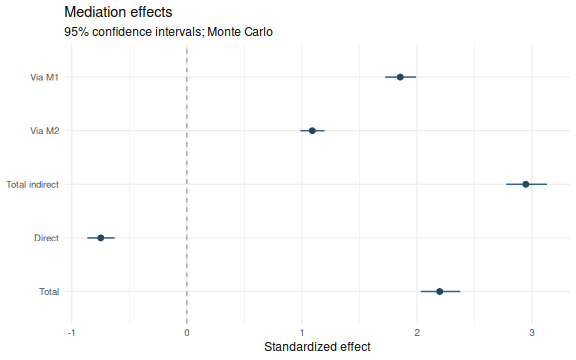
With a moderator, this forest shows effects at the model reference value (centered continuous W = 0, or the reference category). It does not average conditional effects across W. To display different W levels, use the next plot.
Conditional effects by group or selected level
group_plot <- plot_conditional_effects(
  categorical,
  standardized=TRUE,
  paths=c("indirect_1","indirect_2"),
  labels=c(indirect_1="Via M1",indirect_2="Via M2"),
  ncol=2
)
group_plot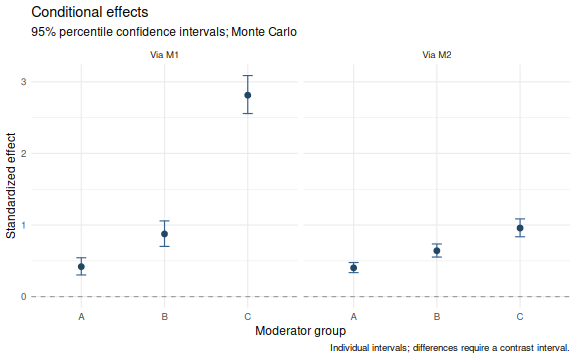
Each point and interval belongs to a fitted group. There are no
interpolating lines between categories. levels can select
and reorder group labels. Choose type = "paths" for
available path coefficients or type = "overall" for total
indirect and total effects. All panels share their effect axis.
The same function can display the stored reference levels of a continuous W:
plot_conditional_effects(
  continuous,
  paths="indirect_effect_1",
  levels=c("-1 SD","0 SD","+1 SD"),
  standardized=TRUE,
  labels=c(indirect_effect_1="Via M1")
)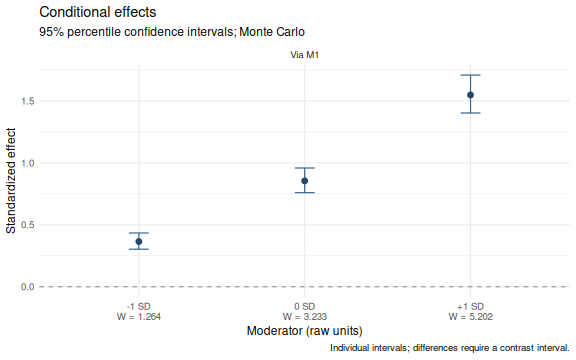
The axis includes raw W values. indirect_1 and
indirect_effect_1 are accepted as aliases when selecting an
available indirect effect; the underlying result tables keep their
existing identifiers.
Differences need their own intervals
One effect having an interval that excludes zero and another having
an interval that includes zero does not establish a difference between
them. plot_contrasts() displays the difference and its own
interval instead.
contrast_plot <- plot_contrasts(
  categorical,
  standardized=TRUE,
  paths=c("indirect_1","indirect_2"),
  labels=c(indirect_1="Via M1",indirect_2="Via M2"),
  ncol=2
)
contrast_plot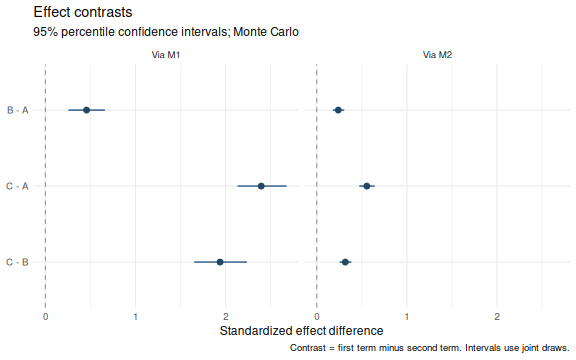
For example, B - A means the conditional effect in B
minus that in A. With a continuous moderator, the same function compares
stored low, mean and high moderator levels. contrasts
selects exact labels from the result table (also visible in
contrast_plot$data$Contrast). Conditional contrasts use the
already-computed joint-draw contrast intervals, not differences between
endpoints of separate intervals.
Without a moderator, the plot compares indirect paths with one another:
plot_contrasts(
  plain,
  standardized=TRUE
)Here the helper uses stored joint draws and fitted/pooled point
estimates. Standardized contrasts are computed with each draw’s own
endpoint scales before forming percentile intervals. No model is
refitted. A moderator fit currently supports contrasts within each
effect across groups/levels, not arbitrary contrasts between different
indirect paths at a fixed W. For continuous moderators,
type = "overall" is unavailable unless an overall contrast
table is present; specific indirect and path contrasts remain
available.
Conditional curves and their highlighted ranges
plot_moderation_curve(
  continuous,
  "total_indirect",
  standardized=TRUE
)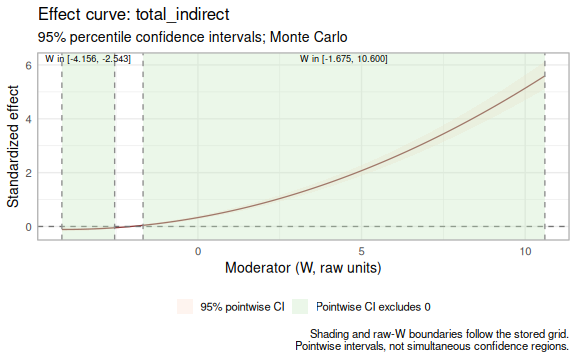
The band uses the fitted confidence level. Shading denotes stored grid values whose pointwise interval excludes zero. Labels give raw W bounds, not sample percentiles. Boundaries are grid approximations; they are not exact Johnson–Neyman boundaries or simultaneous confidence regions. An adjacent change from a negative to a positive interval breaks a highlighted range.
Inspect and export
The plot() methods retain descriptive data-support
information. Continuous probes outside the observed fitted-case
moderator range issue a warning when effects are extracted and remain
marked in the table and plot caption. This is a marginal-range check,
not a test of joint covariate overlap or density. Imputed moderator
values do not extend the observed range.
probe_values <- c(mean(dat$W), max(dat$W) + 1)
supported <- wsmed_effects(
  continuous,
  at = list(W = probe_values),
  terms = "indirect_1"
)
#> Warning: Moderator probes outside the observed fitted-case range of W
#> [-3.17113, 9.61675]: 10.6168. These estimates extrapolate.
as.data.frame(supported)[, c("at", "estimate", "extrapolated")]
#>                 at  estimate extrapolated
#> 1 3.23287569618678 0.8544881        FALSE
#> 2 10.6167533949209 4.5160203         TRUE
plot(
  supported,
  view = "forest"
)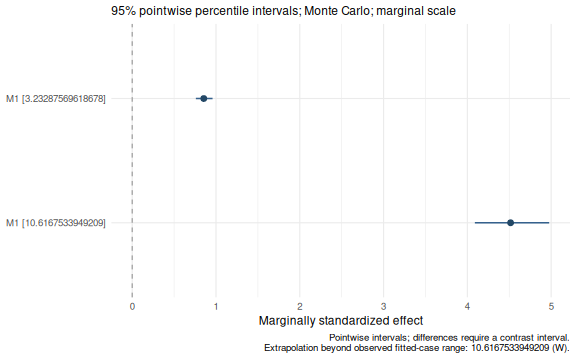
The warning above is intentional. Plotting the extracted object again
does not repeat the warning or resample.
attr(plot(supported), "wsmed_plot")$support records its
observed range. Category plots report fitted group counts; MI captions
report the minimum and maximum across completed datasets. The table also
distinguishes observed memberships (n.observed) from fitted
counts. These counts are not effective sample sizes for the conditional
effects.
forest$data[, c("Path","Estimate","CI.LL","CI.UL")]
#>              Path   Estimate      CI.LL      CI.UL
#> 16     indirect_1  1.8547443  1.7246500  1.9935134
#> 17     indirect_2  1.0906142  0.9875177  1.1972101
#> 18 total_indirect  2.9453585  2.7762265  3.1303118
#> 1              cp -0.7473746 -0.8642842 -0.6260046
#> 19   total_effect  2.1979839  2.0328561  2.3757007
attr(forest, "wsmed_plot")
#> $engine
#> [1] "mc"
#>
#> $standardized
#> [1] TRUE
#>
#> $level
#> [1] 0.95
ggplot2::ggsave(
  "mediation-effects.pdf",
  forest,
  width=8,
  height=5
)
ggplot2::ggsave(
  "group-effects.png",
  group_plot,
  width=8,
  height=5,
  dpi=300
)
All conditional intervals are percentile intervals; bootstrap parameter forest plots use the stored bootstrap interval type. The common marginal scale, fixed raw W probes and joint uncertainty are described in Standardized moderated mediation.